Customers place orders from multiple channels and expect real-time updates, clear delivery timelines, and quick support. But without a reliable system to manage orders end-to-end, your teams often end up switching between tools to handle quotes, stock checks, approvals, shipping updates, and customer requests.
Even when your team is working hard, fragmented systems make you look disorganized. Sales promises one thing, operations sees another, support gets blamed for delays, and customers lose confidence because every answer sounds uncertain. As order volume grows, these small gaps turn into delays, errors, higher costs, and frustrated buyers.
A CRM Order Management System (OMS) connects your customer communication and order processing into one connected workflow. It keeps your team aligned, helps customers receive faster updates, and ensures every order moves smoothly from sale to delivery.
Here’s a list of the top 6 CRM for customer order management that reduce errors, speed up fulfillment, and keep your teams in sync.
| CRM Software | Standout Features | Plans & Pricing (per user) |
|---|---|---|
|
1. Pipedrive
 |
✓ Customizable sales order templates
✓ Smart docs for auto-filled sales orders ✓ Full-funnel order visibility |
Lite: $24/month ($14/month, if billed annually) Growth: $49/month ($39/month, if billed annually) Premium: $79/month ($59/month, if billed annually) Ultimate: $99/month ($79/month, if billed annually) Free Trial: Available for 14 days |
|
2. HubSpot
 |
✓ Advanced pipeline management
✓ Centralized database for order history ✓ Support and feedback management |
Starter: $20/month Professional: $100/month Enterprise: $150/month Free plan: 14-day free trial available |
|
3. Monday CRM
 |
✓ No-code customization
✓ Advanced AI features (AI-powered email writing & task generation) ✓ Drag-and-drop interfaces for order tracking |
Basic: $9/month (billed annually) Standard: $12/month (billed annually) Pro: $19/month(billed annually) Enterprise: Contact sales for pricing Forever Free: Available for up to 2 seats, 3 boards with basic features |
|
4. Salesforce
 |
✓ Complete order visibility & order support
✓ Distributed order management ✓ Omni-channel inventory visibility
|
Salesforce Order Management — Order Visibility: Contact the vendor for pricing Salesforce Order Management — Growth: Contact the vendor for pricing |
|
5. Lark
 |
✓ Document and task management
✓ Automated workflows ✓ Unified client communication |
Starter: Free plan Pro: $12/month(billed annually) Enterprise: Contact sales for pricing Forever Free: Available for up to 20 users |
|
6. LeadHeed
 |
✓ Workflow automation for orders
✓ Visual sales pipeline ✓ Omnichannel inbox ✓ Order and delivery tracking |
Free: $0/month (up to 3 users) Pro: $15/month ($12/month, if billed annually) Elite: $35/month ($28/month, if billed annually) |
What is a CRM Order Management System?
A CRM order management system is a single platform that brings your customer database and your order processing together. It integrates your customer relationship tools with order tracking, so you can see at a glance what was ordered, when it shipped, and whether the customer has had any issues.
With this connected approach, your team spends less time on manual data entry and more time on building loyal customer relationships. It also reduces human error and ensures timely outreach, leading to a better overall customer experience.
Benefits of Using Order Management CRM Software
A CRM with an order management system unifies your customer and order details, so when inventory, invoices, or shipping changes, everyone sees the update instantly. It keeps everyone on the same page, improves accuracy, and helps in better decision-making.
- Centralized Customer and Order Data: An order management CRM stores every interaction of a customer from their first inquiry to their last delivery in a single database. This unified approach gives you instant access to complete customer profiles, showing purchase history, current orders, preferences, and more.
- Better Data Accuracy: Once an order is entered, the order management CRM system automatically updates inventory and creates invoices using the same data. As a result, your team works on current, up-to-date information across all departments, which ensures every record stays consistent and reliable.
- Improved Customer Experience: When you integrate a CRM with an order management system, your support teams can automatically send updates when an order ships, notify customers of delays, and flag potential issues early. It helps you build trust and loyalty, leading to repeat business and more recommendations.
- Informed Decisions: With customer and order data in one system, you can see what products sell best, plan inventory earlier, spot your most loyal customers, and track how long orders take. You also find the common points where orders slow down, helping you focus on what to fix and where to invest.
Top 6 CRM for Customer Order Management
After evaluating dozens of platforms, we’ve shortlisted the strongest solutions that combine customer relationship management with order tracking. Below is a detailed overview of each option, including key features, pros, and cons.
1. Pipedrive
Pipedrive is a sales-centric CRM order management system that helps teams track leads and deals in a visual pipeline. You can create multiple pipelines, customize stages, and add custom fields so your workflow matches how your business sells and fulfills orders.
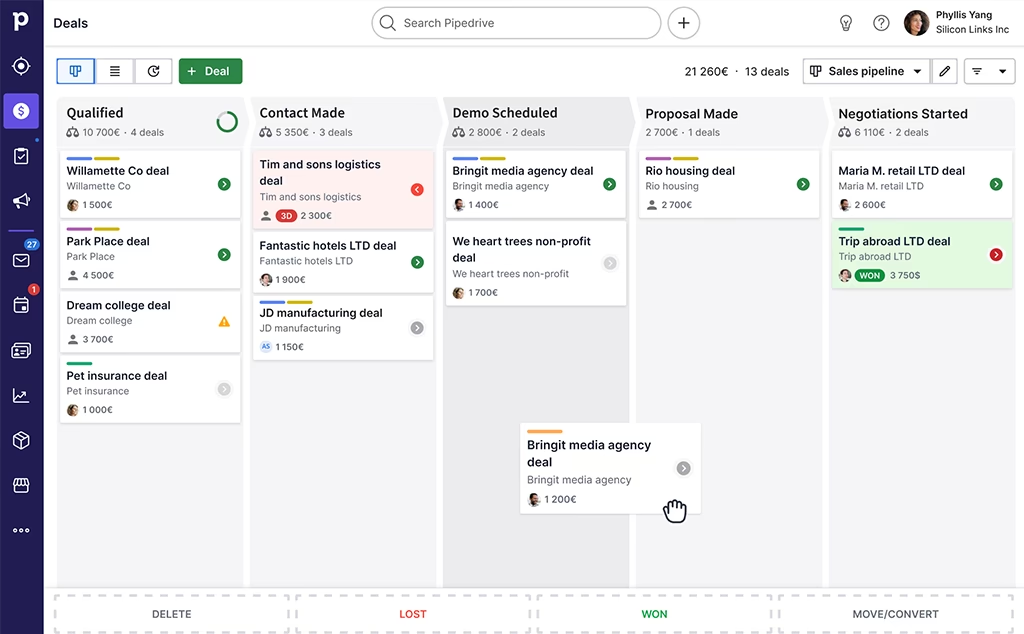
Additionally, Pipedrive helps you track orders in real time, forecast sales to plan inventory, and automate order confirmations. It integrates with tools like Stripe and e-signature platforms to smooth out the payment and approval process.
Features:
✔ Sales CRM dashboard for complete activity visibility
✔ Email automation to send order confirmations
✔ Sales and order tracking
✔ Smart docs for document management
✔ Product catalog integration
| Pros | Cons |
|---|---|
| ✅ Tracks customers’ orders in real time ✅ Streamlines order processing with integrations (Stripe, e-signature tools) ✅ Centralizes communication by linking emails, calls, and meeting history to each deal ✅ Helps plan production and inventory with sales forecast ✅ Creates templates that auto-fill your saved deal and contact details |
❌ Features like Smart Docs cost extra on the basic subscription plans ❌ Lacks built-in inventory and shipping tools, requiring integration with other apps. ❌ Needs more advanced reporting features for detailed analytics |
2. HubSpot
HubSpot is an all-in-one CRM combining marketing, sales, and service platforms. It integrates order data directly with customer records and tracks sales pipelines with custom stages. It ensures your teams have full visibility, from the initial quote to delivery and renewal.
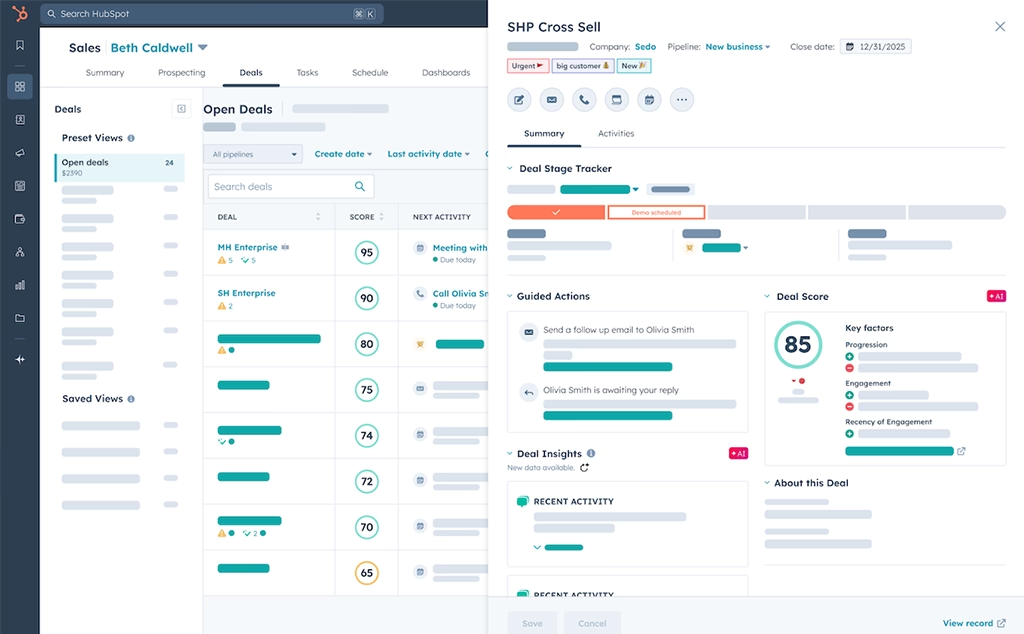
Furthermore, you can also automate order follow-ups with workflows, and keep data aligned with other tools (like ecommerce or accounting systems) using integrations and Data Sync. Plus, your support team has a complete history of customers, allowing for real conversations.
Features:
✔ Order tracking automation with real-time status updates
✔ Deal pipeline management to track every stage of the order
✔ CPQ (Configure, Price, Quote) for accurate pricing
✔ Customer profiles for 360° view of customer
✔ Integrated payments to collect funds directly within a CRM
| Pros | Cons |
|---|---|
| ✅ Offers free plan with robust functionalities ✅ Has user-friendly interface ✅ Provides insights into customer behavior with detailed reporting ✅ Creates and updates deals from existing customer records to keep your order pipeline accurate ✅ Integrates seamlessly with ecommerce platforms (Shopify, BigCommerce) and other tools (Gmail, Outlook) to automate data flow |
❌ Needs upgrade to higher-tier plans for automation and reporting ❌ Lacks built-in inventory tracking, making it difficult to manage stock levels ❌ Requires external integrations like Shopify to handle complex online store tasks |
3. Monday CRM
Monday CRM is a customizable CRM for customer order management, where you can build an order tracking workflow that matches your business. You can create an “Orders” board, define your own order stages, and move orders forward as they progress. To track each stage, you can use visual views like Kanban (by status) and Timeline/Gantt (to see dates and schedules).
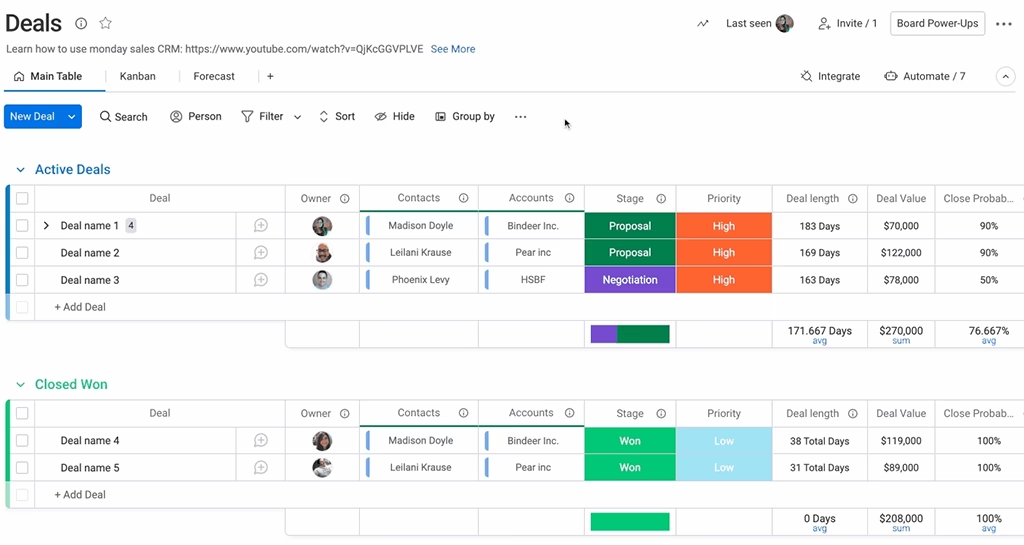
Furthermore, Monday CRM brings customer details, order status, and team collaboration into one unified workspace, giving your team complete visibility of your order pipeline. It helps orders move smoothly from placement to delivery and enhances customer experience.
Features:
✔ Full lifecycle tracking (from order to payment)
✔ Simplified return and refund management
✔ Automated inventory tracking to manage stocks
✔ Task automation for updates and notifications
✔ Customization and automation builder without code
| Pros | Cons |
|---|---|
| ✅ Simplifies order tracking with color-coded statuses and drag-and-drop layout ✅ Keeps your departments updated by automatically syncing orders ✅ Centralizes your orders, teams chats, and customers in one platform ✅ Generates email responses and enhances client interactions by using advanced AI features ✅ Integrates with platforms like Shopify to import orders effortlessly |
❌ Steep learning curve for advanced features ❌ Bulk data imports can be a bit frustrating ❌ Experiences minor lags during peak, real-time collaboration |
4. Salesforce
Salesforce is an enterprise-level CRM order management system that brings sales, shipping, and customer service together in a single platform. The system is designed to handle complex, high-volume operations and unifies the customer journey across every touchpoint.
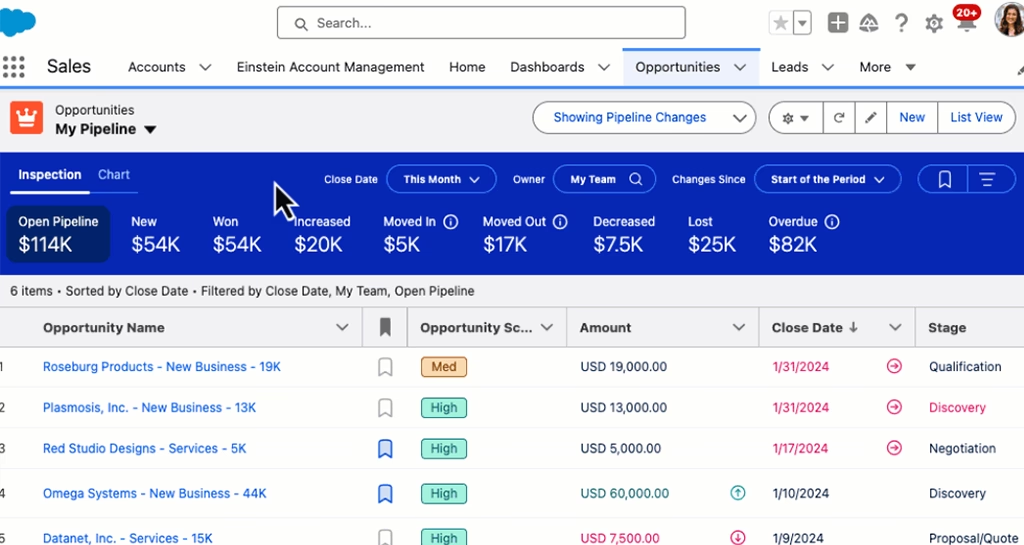
The platform features a Distributed Order Management system, which helps you get products to customers more efficiently. It automates manual tasks like order routing and inventory updates, freeing up your team from constant data entry.
Features:
✔ Complete order lifecycle management to track every stage of purchase
✔ Distributed order management for faster order fulfillments
✔ Native integration to Service Cloud connects sales and support teams
✔ Preintegration in the B2C commerce cloud for syncing your website sales with the system
✔ Omnichannel inventory with real-time tracking
| Pros | Cons |
|---|---|
| ✅ Enhances overall sales performance with seamless integrations ✅ Automates key processes, reducing human errors ✅ Connects commerce, sales, and service clouds for a complete view of the customer journey ✅ Offers live visibility to prevent stockouts and overstocking ✅ Mobile accessibility to manage orders from any location |
❌ Can be expensive compared to other competitors ❌ Needs technical expertise for implementation and maintenance ❌ Difficult customization for unique business needs |
5. Lark
Lark is a unified CRM and order management system that simplifies your order lifecycle with automated workflows. Your customer records are directly linked to the CRM, so every order, update, and notes are captured, providing you with full visibility and traceability.
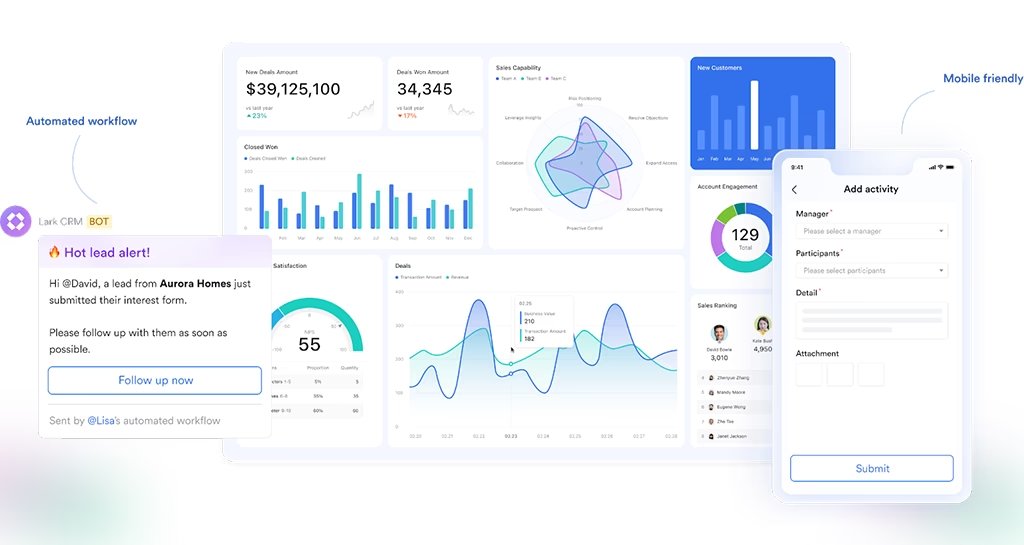
Built for real-time collaboration, Lark ensures that any change in an order, such as confirmation, packing, dispatch, delivery, or returns, is instantly reflected for the whole team. This keeps everyone aligned and reduces delays. It also allows you to assign tasks to your teams, from packaging to customer feedback, with deadlines and progress tracking.
Features:
✔ Centralized database for clients, products, and orders
✔ Workflow management keeps every order on schedule
✔ Integrated collaboration between teams
✔ Streamlined order validation to ensure compliance for custom orders
✔ Lark calendar & meetings to plan events and set reminders without switching apps
| Pros | Cons |
|---|---|
| ✅ Maintains compliance and data privacy with role-based permissions ✅ Integrates chat and video, providing seamless communication ✅ Helps align teams by scheduling delivery reviews or client calls directly from an order record ✅ Enables teams to create quotes, proposals, and invoices linked to customer records ✅ Provides customizable workflows and reduces manual work |
❌ Offers fewer third-party integrations compared to Salesforce and Hubspot ❌ Can be slow, especially when you are handling a lot of data or connected apps |
6. LeadHeed
LeadHeed is a beginner-friendly, all-in-one CRM built for businesses that want a clean way to manage customers and orders within a single system. You can set up an order pipeline with stages that match your process, such as New Leads → Quote → Invoice Sent → Paid → Packed → Shipped → Delivered. Then you move each order forward as it progresses. You can also add custom fields to store order details like product type, delivery date, and payment status.
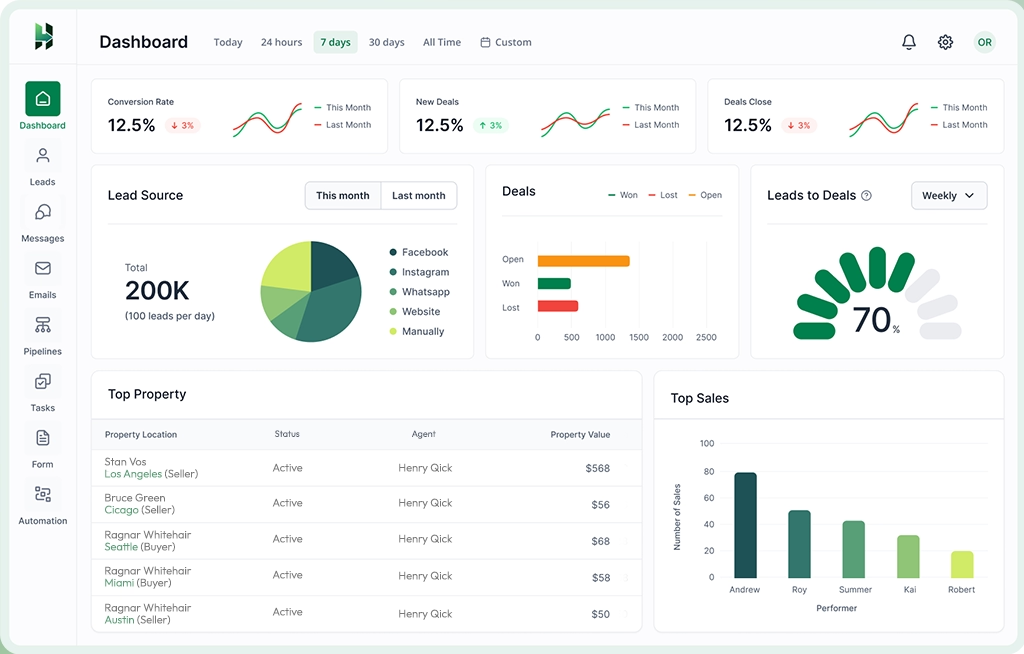
Additionally, LeadHeed keeps customer information connected to every order. This way, your team can see all updates, notes, and past communication in one record. You can assign tasks to team members, set reminders, and automate follow-ups when an order moves to the next stage.
Features:
✔ Visual sales pipeline
✔ Task management and automation for follow-ups and order fulfillment
✔ Insights & reports for data-driven decisions
✔ Third-party integrations to streamline your workflow
✔ Unified communication and email management
| Pros | Cons |
|---|---|
| ✅ Eliminates data silos by consolidating contacts, communication history, and deal stages ✅ Reduces manual work with automated follow-ups and task assignments ✅ Can be accessed from anywhere to track orders ✅ Offers a user-friendly interface with clear visibility ✅ Free trial for 14-days without a credit card required |
❌ Requires higher-tier plans to get features like email automation and unlimited pipelines ❌ Not ideal for complex inventory management |
How to Choose the Right CRM for Customer Order Management?
To choose the right CRM with an order management system, clearly define your goals and look for the essential features like order tracking, stock management, payment, and more. Then, ensure that the system integrates seamlessly with other tools, and evaluate ease of use for smoother adoption.
I. Define Your Objectives: Identify what problem you want to solve with the system. It may be tracking orders, faster delivery, or improving customer experiences. Clear goals help you choose a CRM that matches your workflow and avoids paying for features you won’t use.
II. Review the Features: Look for essential features like order tracking and fulfillment, inventory management, invoicing, and reporting. If relevant, also check for quotes/invoicing, returns handling, inventory visibility, and dashboards to spot delays.
III. Verify Integration Possibilities: Ensure your system integrates seamlessly with existing tools like e-commerce platforms (like Shopify) or accounting software. Smooth integration prevents manual data entry errors and makes sure everyone has access to the same updated data.
IV. Consider Ease of Use: Choose a system that is simple enough for your team to use daily without heavy training. A clean interface and easy navigation increase adoption and ensure order updates stay accurate.
V. Evaluate Long-term Scalability: Pick a platform that can grow with your business by allowing more users, automations, and integrations as order volume increases. Check pricing tiers and plan limits (like workflows, contacts, or reports) so you don’t outgrow the system too quickly.
Conclusion
A strong CRM with order management does more than track customers; it gives your team clarity, speed, and control. The right platform helps you handle orders efficiently, reduce manual work, and improve communication at every stage, which ultimately leads to fewer errors and happier customers. When comparing options, focus on workflow fit, integrations, reporting, and ease of use to help your team stay consistent as order volume grows.
If you’re looking for a simple, all-in-one tool to manage customers, orders, and communication in one place, LeadHeed is a practical choice. It makes order management easier by letting you track each order through clear stages, keep every update tied to the customer record, and use tasks, reminders, and automation to prevent delays and missed follow-ups. Start a 14-day free trial—no credit card required.
FAQs
What is the difference between CRM and order management?
A CRM is a tool for managing customer data, like contact details, past purchases, and so on. On the other hand, order management tracks the full order lifecycle and automates key steps like processing, invoicing, and fulfillment.
Which industries benefit most from CRM order management software?
Any industry that handles high order volumes and multi-channel sales, like ecommerce, retail, wholesale, manufacturing, and B2B distribution benefit the most from CRM order management software.
What features should I look for in a CRM with order management?
A strong CRM with order management should offer order and pipeline tracking, automated invoicing and notifications, inventory updates, and a unified customer database. It’s also helpful to have customizable dashboards and seamless integration with your existing sales and ecommerce platforms.
Is CRM order management software suitable for small businesses?
Yes. Many CRM platforms like LeadHeed offer affordable plans and scalable features that allow small businesses to manage orders efficiently without investing in complex enterprise systems.