Finding leads online sounds easy, but anyone who has tried knows how frustrating it can be. You open dozens of websites, copy details into sheets, and still end up with missing and outdated contacts. This slow process wastes time, drains energy, and often leads to lost sales opportunities.
Lead scraping tools automate the process of extracting data across online platforms and fill your CRM with leads. It helps you find and collect the lead information that best fits your business.
| Lead Scraping Tools | Standout Features | Plans & Pricing (per user) |
|---|---|---|
|
1. PhantomBuster  |
✓ ATS + recruiting CRM in one place
✓ Unique lead generation (from live data, not stale databases)
✓ “No-Code” phantom & flow system ✓ Large-scale automation (270K+ automations launched daily) ✓ AI-powered personalization & engagement |
Starter: $56/month, 5 slots for phantoms Pro: $159/month, 15 slots for phantoms Team: $439/month, 50 slots for phantomsFree Trial: Available for 14 days |
|
2. Apify
 |
✓ Pre-built scrapers for data extraction
✓Anti-blocking infrastructure ✓ Seamless integration and automation ✓ Code templates and Discord community |
Forever Free: $0 with $5 monthly credits + all features included
Starter: $29/month ($26/month, if billed annually) |
|
3. Octoparse
 |
✓ AI-powered scarpers without code
✓ Cloud-based scalability & automation ✓ Flexible data privacy control ✓ Pre-built lead generation templates |
Free: $0 Standard Plan: $83/month ($69/month, if billed annually) Professional Plan: $299/month ($249/month, if billed annually) Enterprise Plan: Contact Sales for pricingFree Trial: Available for 14 days |
|
4. Lusha
 |
✓ Real-Time Buying Signals
✓ Bulk data enrichment ✓ Automated GTM workflow ✓ Seamless CRM integration ✓ Data accuracy and verification |
Free: $0/month, includes 1 seat Pro: $29.90/month ($22/month, if billed annually) Premium: $69.90/month ($52/month, if billed annually) Scale: Custom pricing with custom seatsFree Trial: Available with 40 credits per month |
|
5. UpLead
 |
✓Real-time email verification
✓ Targeted prospecting with 50+ Filters ✓ Technographics filter ✓ Bulk downloads & advanced data enrichment |
Free: $0 Essential: $99/month ($74/month, if billed annually) Plus: $199/month ($149/month, if billed annually)Free Trial: Available for 7 days |
|
6. Snov.io
 |
✓ Automated email warm-up to avoid spam filters
✓ Multi-language interface for global teams ✓ LinkedIn automation ✓ Advanced email finder & scraping capabilities |
Starter: $39/month ($29.25/month, if billed annually) Pro: $99/month ($74.25/month, if billed annually) Custom Ultra: Customer pricingForever Free Plan: Available |
|
7. Lead Scrape
 |
✓ Built-in proxies to prevent blocking
✓ Unlimited data export with 1 year free updates ✓ Advanced Data Points (precise location data) |
Standard: $79, 1-year license Business: $199, 1-year licenseFree Trial: Available |
|
8. Import.io
 |
✓ Point-and-click interface for non-coders
✓ AI-native web extraction ✓ Self-healing data pipelines ✓ Enterprise-grade reliability ✓ Compliance-first data extraction |
Free: $0/month Basic starting price: $299/monthFree Trial: Available for 14 days |
What Is a Lead Scraping Tool?
A lead scraping tool is a software that automatically extracts contact information like names, email addresses, phone numbers, etc., from websites and social media platforms. The lead scraping tools crawl through sources like LinkedIn and other social media to gather data in bulk.
The collected information is exported into formats like CSV or Excel, and then used to build a large-scale new lead list. It helps you save time, reduce manual effort, and build large, targeted prospect lists faster.
How Does Lead Scraping Work?
Lead scraping works by identifying your target customers, gathering required information from websites, organizing it, and preparing for outreach. Instead of finding leads manually, it automates the entire process, saving your teams time and effort.
1. Targeting
The first step of lead scraping is targeting your ideal customer, such as local businesses, SaaS startups, or freelancers. You also need to understand where these leads are most active, like social media, professional forums, or company websites. The more specific you are with your criteria, like industry, company size, or job title, the better and warmer (more interested) your leads will be.
2. Website Scanning and Data Extraction
The lead scraping tools crawl to selected sources, including business directories and company websites. and capture the data you’ve defined. It includes lead names, job titles, emails, phone numbers, and company details.
3. Cleaning and Formatting
The extracted raw data from websites is generally messy and unorganized. A lead scraper tool also cleans the extracted data by removing duplicates, fixing errors, and organizing it in a spreadsheet or a CRM.
4. Storage and Usage
Finally, you can save the collected new lead list locally on your device or in the cloud. You can filter, add tags, and start contacting leads with personalized emails or sales messages. You reach out to these leads, initiate a conversation, and qualify them.
Benefits of Using Lead Scraping Tools in 2026
Lead scraping tools automatically gather contact details (like emails, phone numbers, and social profiles) from websites, which cuts down manual work and saves a lot of time. They also help businesses quickly create targeted lead lists, run better campaigns, and boost conversions using up-to-date, quality data.
- Improved Efficiency: You can automate your lead scraping and get your work done quickly, instead of doing it manually, which could take days or even weeks.
- Cost-effectiveness: You can generate a large volume of targeted leads without paid advertising or marketing campaigns.
- Accuracy: Manual data entry is prone to human errors. With lead scraping tools, you get accurate and updated data in a click, improving email and call outreach.
- Faster market reach and competitive advantage: You can reach potential customers before competitors do by identifying and contacting prospects early. It helps build trust sooner and increases the chances of winning the deal.
- Targeting: A lead scraping tool helps you filter the leads based on industry, job title, company size, and more. It ensures every lead you get is the right fit for your products.
8 Best Lead Scraping Tools
The right lead scraping tool pulls fresh, verified contacts from across the web and pushes them straight into your workflow. Here are 8 of the best lead scraping tools for extracting contact details from LinkedIn, Google Maps, and more.
1. PhantomBuster
PhantomBuster is a lead-scraping tool with 100+ automations known as “Phantoms” (single automations) and “Flows” (sequences). The tool allows you to extract publicly available information from social platforms like LinkedIn, Instagram, and X, and send the data directly to your connected CRM.
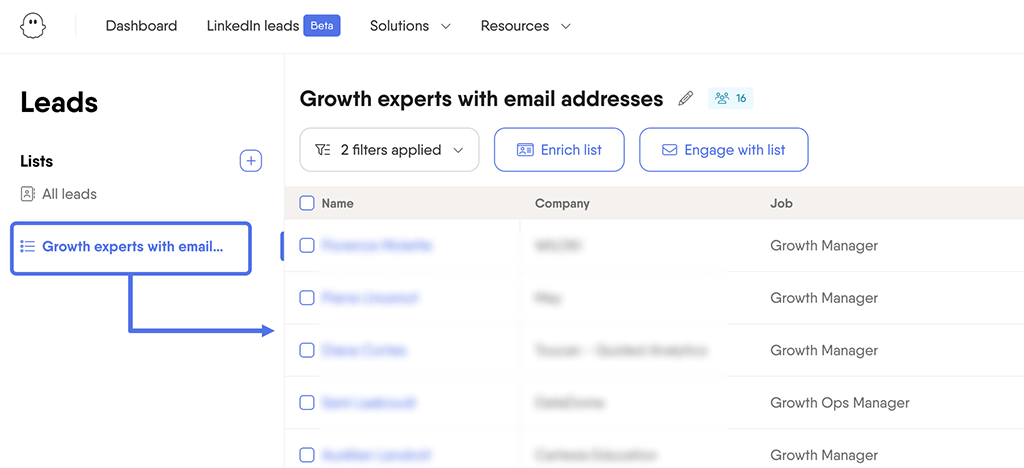
Instead of relying on stale databases, Phantombuster helps you find warm leads, so your sales teams can create targeted pipelines effectively. It is a code-free automation tool, especially useful for sales and marketing teams that want to speed up prospecting by automating repetitive manual research.
Key Features:
✔ Pricing per workspace rather than per user, so you add sales team members without raising costs
✔ Unlimited exports without any download restrictions
✔ Seamless integrations with CRM like HubSpot, Salesforce, and Zapier
✔ Lead generation & data enrichment tool to extract updated data
✔ Built-in personalization tags to ensure automated messages still feel human
| Pros | Cons |
|---|---|
| ✅ Offers 100+ pre-built “phantoms” for data extraction across social media platforms ✅ Generally easy to set up without any technical expertise ✅ Collected data can be extracted in spreadsheet format |
❌ May need expertise for advanced uses ❌ Needs ongoing monitoring to run smoothly |
2. Apify
Apify is a web scraping tool that uses “Actors” (pre-built automation) to extract contact details and social profiles from different websites and online platforms. It is an enterprise-grade lead scrape that can handle massive data extraction tasks.
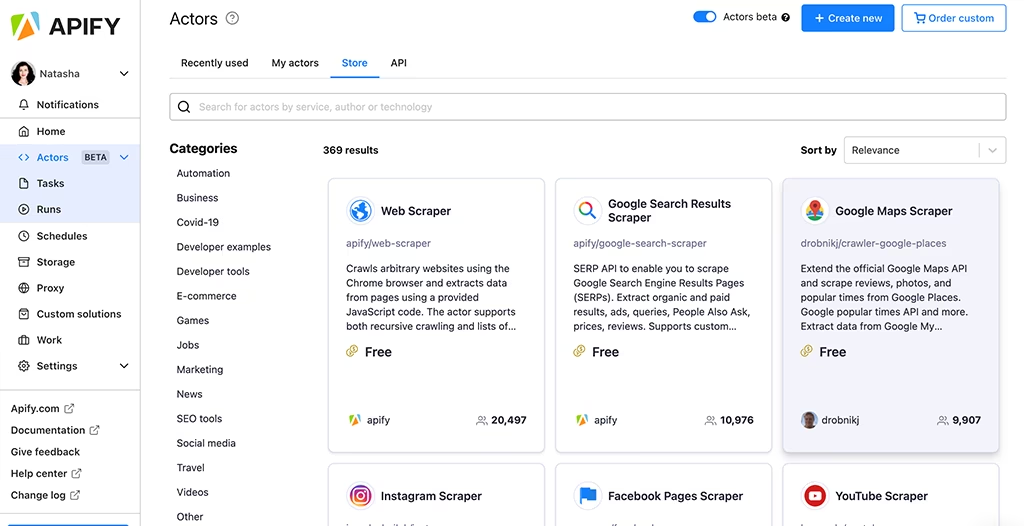
Apify can scrape large amounts of data from almost any website, including Amazon, Google Maps, and e-commerce sites. It uses proxy rotation and residential IPs to reduce blocks, making it reliable for high-volume scraping.
Key Features:
✔ Pre-built web scraping tools
✔ Community and chat support that provides instant responses
✔ Advanced anti-blocking technology to prevent website restrictions
✔ Tiered support levels that scale with your plan
✔ Seamless integrations with APIs and cloud services
| Pros | Cons |
|---|---|
| ✅ User-friendly interface without needing setup ✅ Automates scheduling to set up workflows ✅ Reduces the risk of being blocked by target websites with built-in proxy rotation |
❌ Advanced customization can overwhelm non-technical users ❌ Credit-based pricing becomes costly with high-volume scraping |
3. Octoparse
Octoparse is a no-code web scraping tool that lets you collect data using a visual, point-and-click interface. It auto-detects lead information on any page, highlights lead data for you to choose, and then builds the scraper automatically.
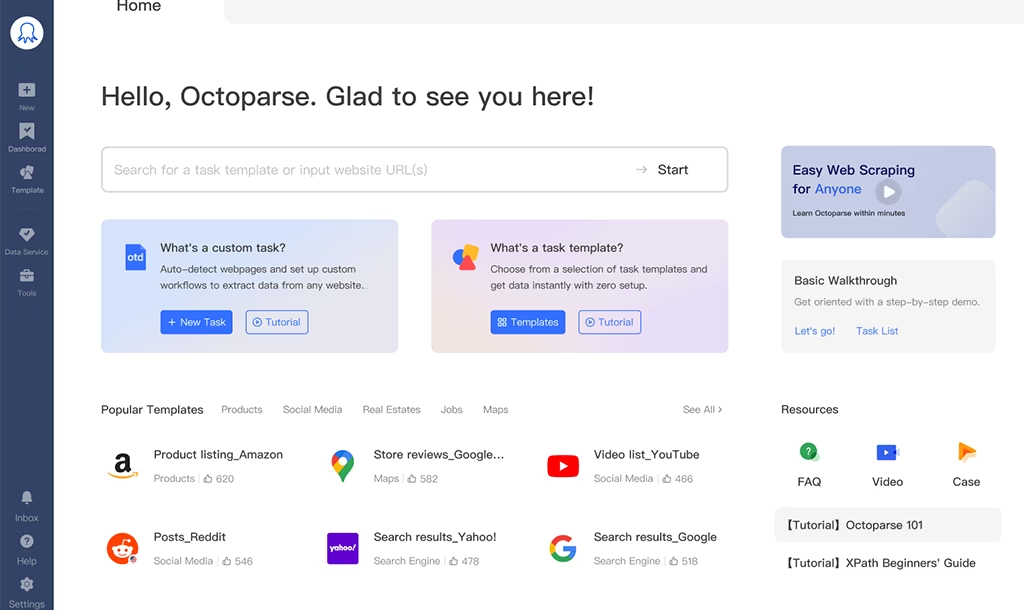
You can run scrapers on your own computer for smaller tasks or use Octoparse Cloud to run them 24/7 for larger operations. You still need the desktop app to create and set up the scrapers, but the cloud option keeps your data updated continuously in the background without slowing down your computer.
Key Features:
✔ No-code visual scraper builder with AI-powered auto-detect feature
✔ Pre-built templates for extracting data from platforms like Google Maps and Yellow Pages
✔ Cloud-based scalability for scraping leads at scale
✔ Built-in IP rotation and residential proxies to prevent blocking your scraping activities
✔ Automated exports in formats like Excel, CSV, and XML
| Pros | Cons |
|---|---|
| ✅ Suitable for non-technical users ✅ Provides ready-to-use templates for popular websites, such as social media ✅ Cloud scraping, it allows tasks to run 24/7 |
❌ You must install the desktop application to build scrapers ❌ The free plan comes with limited features for scraping |
4. Lusha
Lusha is a B2B intelligence tool that helps sales and marketing teams find and scrape verified work emails, phone numbers, and company details. Its browser extension lets you pull contact details quickly while browsing LinkedIn or company websites.
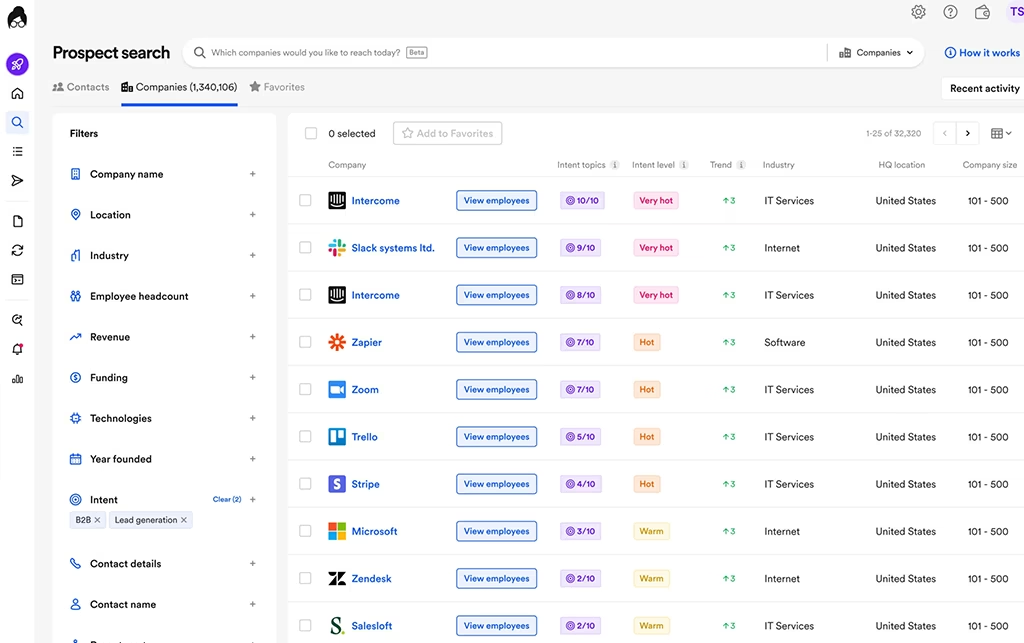
Beyond simple scraping, Lusha uses AI-driven recommendations to help users find prospects that match their Ideal Customer Profile (ICP). Plus, it follows privacy laws like GDPR and CCPA and maintains security certifications such as ISO 27001, ISO 27701, and SOC 2 Type II.
Key Features:
✔ Lusha browser extension that helps you find verified B2B emails
✔ API and integrations for a single source of truth
✔ Real-time buying signals to reach out to prospects on right time
✔ Multi-language interface allowing global teams to work in their preferred language
✔ Seamless CRM integration to sync your data without manual exports
| Pros | Cons |
|---|---|
| ✅ Comes with advanced filters for industry, job title, and location ✅ Integrates with major platforms and CRMs ✅ You can enrich a large volume of data with accurate contact details |
❌ Can be slow with a large volume of data ❌ You are restricted to fewer websites for scraping |
5. UpLead
UpLead is a B2B lead generation tool that focuses on data accuracy. It offers real-time email verification, which verifies every email in real time right before you download it. It helps your teams reduce bounced emails and improve cold outreach deliverability.
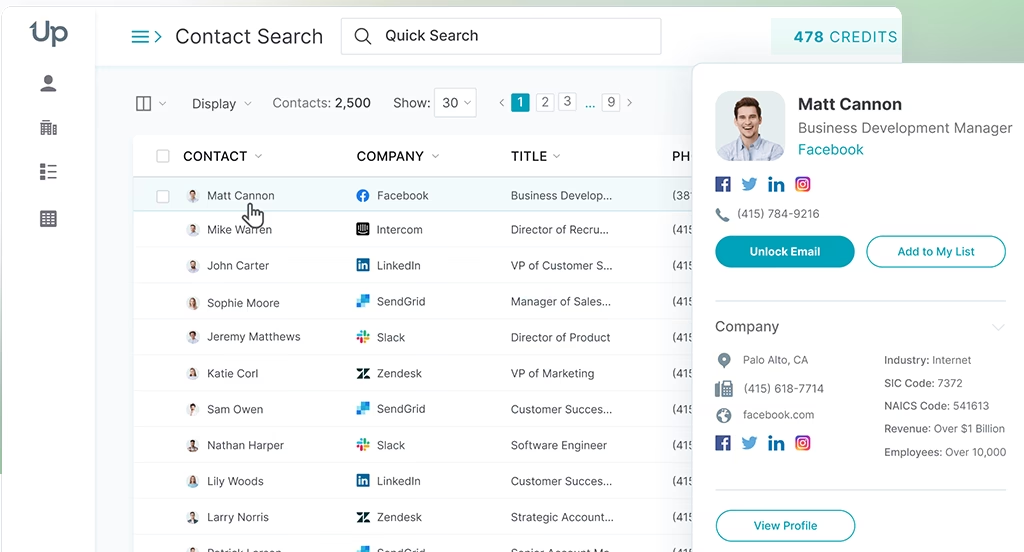
The platform also features a large database with 160M+ profiles and technographics filters, which lets you identify companies based on the specific software and technology they are currently using.
Key Features:
✔ Advanced filters including job titles, industry, and more
✔ Bulk downloads and processing
✔ Real-time email verification to reduce bounce rates
✔ Data enrichment to keep your data updated and clean
✔ Technographics filter to segment prospects based on the technologies they use
| Pros | Cons |
|---|---|
| ✅ Gurantees 95% accuracy on B2B contact data ✅ Verifies email in real-time ✅ Ensures smooth data transfer with integrations |
❌ Can be expensive for small businesses ❌ Initial integration often needs technical knowledge |
6. Snov.io
Snov.io works as an outbound lead-scraping tool, helping you scale your cold outreach. It collects B2B leads in bulk on LinkedIn, blogs, company websites, and any other online platforms using web tools and browser extensions.
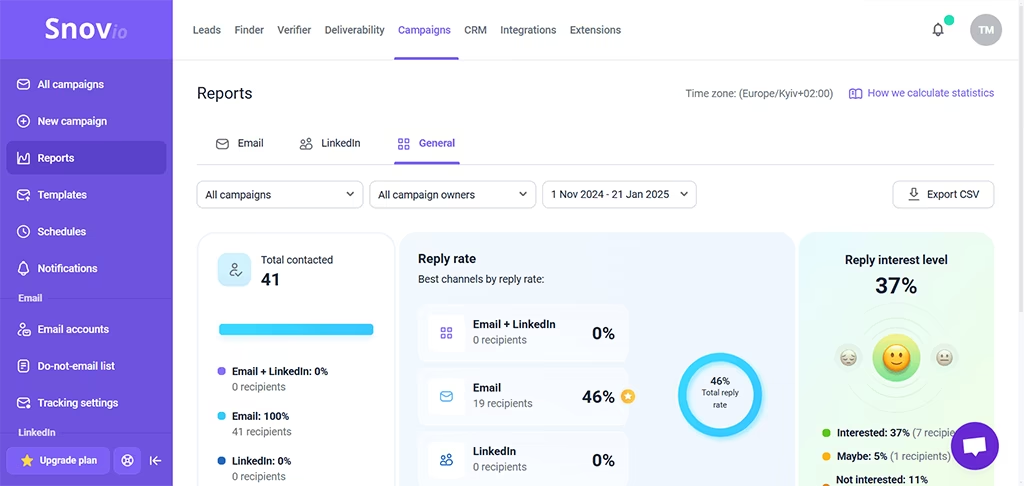
Moreover, Snov.io includes an email verifier to reduce bounces, automated email drip campaigns for cold outreach, and email tracking (opens/clicks) to monitor engagement. It also offers sales workflow tools like a lightweight CRM, integrations, and an API, depending on your plan and setup.
Key Features:
✔ 7-tier email verification and bounce risk detection
✔ Email finder extension to collect leads from LinkedIn profiles and company pages
✔ Email warm-up to build a positive sender reputation
✔ Unibox that manages all communication in one place
✔ Built-in sales CRM with task management
| Pros | Cons |
|---|---|
| ✅ Automated drip campaigns help simplify your outreach ✅ More budget-friendly than competitors ✅ Email finder helps quickly find and collect emails from blogs |
❌ It becomes expensive as your business grows ❌ Automation lacks flexibility for non-standard sales processes |
7. Lead Scrape
Lead Scrape is a desktop-based leads scraping software designed to find and extract B2B leads from local or regional sources. The tool automates lead-finding processes by letting you target any prospects by industry/niche and location, including searches by city, state, or ZIP code.
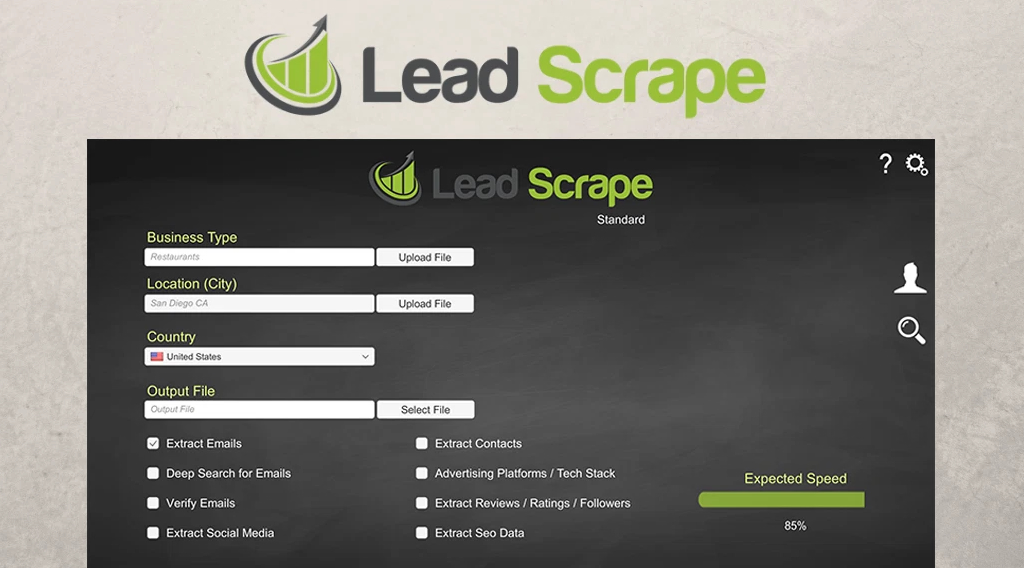
Furthermore, the solution includes email scraping and an email verification feature to help you check the quality of collected emails, and it can pull extra details like social profiles and a company’s tech stack, depending on the source.
Key Features:
✔ Social media profile extraction to gather key information
✔ Geolocation data for location-based targeting
✔ Built-in proxies to avoid IP blocks
✔ Unlimited projects and bulk searches
✔ Multi-platform support (the software runs on both Windows and Mac OS)
| Pros | Cons |
|---|---|
| ✅ Delivers better contact details for targeted outreach campaigns ✅ Gives you insights into the tools that your potential clients are using ✅ Integrates with CRM/SEO tools, including Ahrefs and Semrush |
❌ Licenses are restricted to two computers ❌ Since it’s a local tool, it doesn’t offer continuous cloud-based scraping or automation. |
8. Import io
Import.io is a web data extraction platform with AI native automation that turns any website content into structured data. The tool uses machine learning to identify data patterns and adjust to website changes automatically.
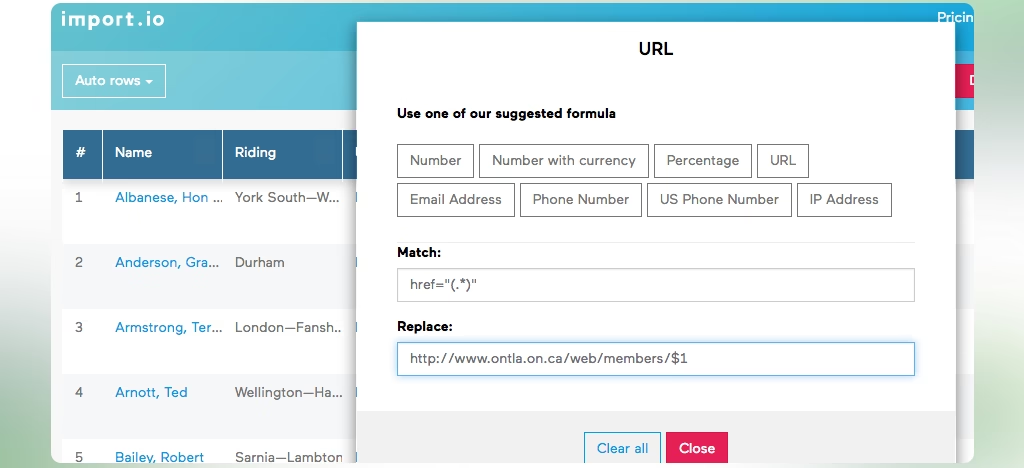
It’s built to support scheduled, repeatable extractions at scale, with options like multi-page workflows, authenticated (login) extraction, and controls such as country-specific extraction and PII masking.
Key Features:
✔ Scheduled data extraction that automates data collection
✔ AI-powered data extraction to detect patterns and adapt to changes
✔ Dynamic content handling to collect data from JavaScript-heavy websites
✔ Point-and-click interface to gather data without coding
✔ Compliance-first data filters for ensuring your data collection stays compliant with regulations
| Pros | Cons |
|---|---|
| ✅ Allows smoother lead flow by using machine learning to adapt changes to the website layout ✅ Extracts protected, high-value web sources with ease ✅ Cloud-based platform allowing instant access from anywhere |
❌ May struggle with more complex website features like infinite scrolling or captchas ❌ Higher cost for advanced features |
Best Practices for Effective Use of Lead Scraping Tool
The best practices while using lead scraping tools include protecting user data, verifying your leads, respecting legal and ethical standards, and updating information regularly. By following these, you create accurate, reliable contact lists that drive better marketing and sales outcomes.
- Follow Legal and Ethical Guidelines: You should respect a website’s terms of conditions and service and robots.txt rules, and make sure your process aligns with data protection laws like GDPR. Also, avoid collecting sensitive personal data without consent, and never use scraped data to mislead, spam, or harm users.
- Protect Data Privacy and Security: If you store sensitive information such as email addresses and phone numbers on your server, it must be encrypted to prevent data leaks. You should collect only the relevant information and regularly remove outdated and unused data.
- Focus on Data Quality: One accurate lead is far more valuable than a hundred unreliable ones. To ensure data accuracy, use email verification and source trusted websites.
- Scrape Responsibly to Avoid Blocks: When you use poorly configured scrapers, it can trigger anti-bot systems and get your IP blocked. Therefore, limit your request speed to prevent overloading the website.
- Monitor and Improve Continuously: Websites change their layouts, companies move offices, and people change roles. Therefore, you must regularly review and update your lead data to ensure it remains accurate and reliable over time.
- Use Proxies: Sometimes, the best leads for your business are in a different country; however, many websites block visitors from certain regions for security concerns. Using a proxy assigns you a local IP, so you can browse from a specific geographic location and see the same data as a local user.
Conclusion
Lead-scraper software is essential for businesses looking to generate targeted leads efficiently. These tools reduce manual effort and improve data accuracy by automating the collection of contact information from websites, social media, and directories.
Since every business has different needs, the best tool depends on where you find leads and how much data you handle. Whether you prefer no-code scraping, verified B2B contact enrichment, or large-scale automation, choosing the right platform and using it responsibly with privacy, verification, and regular updates will help you build better lead lists and convert faster.
FAQs
How to scrape data for leads?
To scrape data for leads, define your target audience, extract information across websites, and export into a clean spreadsheet for your sales team.
What is the best lead scraping tool?
The best lead-scraping tool depends on your needs. Some of the best tools are PhantomBuster, Apify, and Octoparse.
Are lead scraping tools legal?
Yes, lead scraping is legal as long as you only collect publicly available information and comply with data privacy regulations like GDPR and CCPA.