If your team still tracks leads in spreadsheets and reminders, you are paying a hidden cost: missed timing. CRM automation lets you set rules that trigger actions to assign leads, send follow-ups, create tasks, and update pipeline stages without manual work.
An automated CRM brings order to daily sales work. It reduces manual updates, keeps follow-ups consistent, and helps teams respond faster. With the right CRM automation tools, you can run a clean process across sales and marketing, improve lead handling, and reduce the chances of losing deals due to slow response.
What Is CRM Automation?
CRM automation means your CRM completes routine sales and marketing tasks automatically based on rules you set. It reduces manual work and keeps your sales workflow consistent. You decide what should happen, and when it should happen.
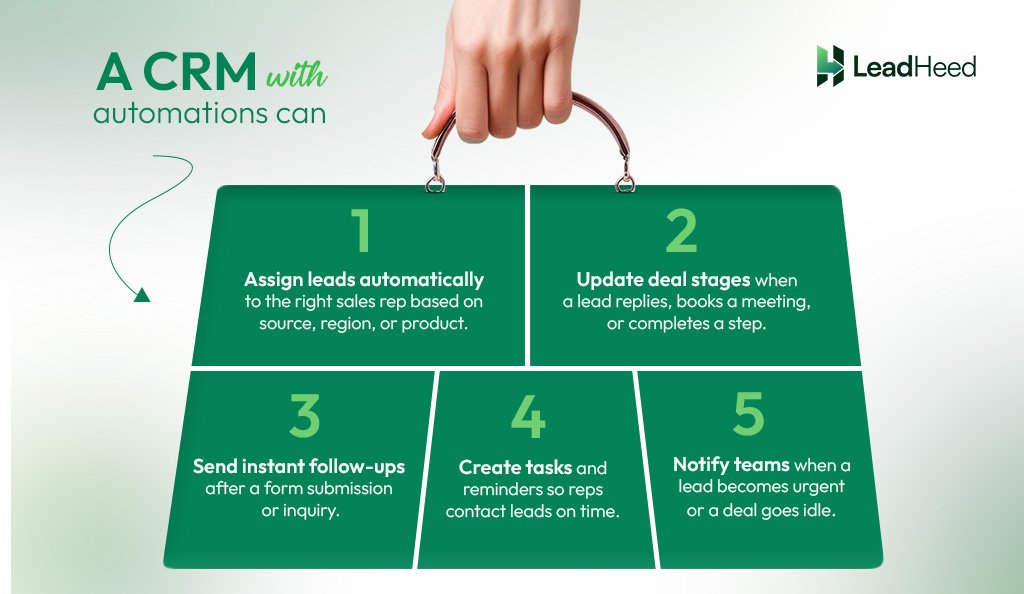
A CRM with automations can:
- Assign leads automatically to the right sales rep based on source, region, or product.
- Send instant follow-ups after a form submission or inquiry.
- Create tasks and reminders so reps contact leads on time.
- Update deal stages when a lead replies, books a meeting, or completes a step.
- Notify teams when a lead becomes urgent or a deal goes idle.
How Does CRM Automation Work?
CRM automation works on a simple logic: trigger and action. A trigger is an event, such as a new lead form submission, a deal stage change, or no reply for two days. An action is what the CRM does when an event happens, such as assigning the lead, sending a follow-up email, or creating a task.
Example of a simple CRM automation workflow:
- Trigger: A lead submits a contact form
- Actions: Assign the lead → send a confirmation email → create a task to call within 30 minutes → notify the sales manager if no action happens in 1 hour
You set the automation rules in your CRM, and the system runs the workflow every time the trigger happens.
The table below has 10 common examples of triggers and actions that businesses use in CRM for sales and marketing automations.
| Triggers | Actions | |
| 1. Lead submits a form, chat, or ad inquiry |
➔ |
Assign owner based on source, region, service, or round-robin |
| 2. New lead created |
➔ |
Send confirmation email + create a call task within 15–30 minutes |
| 3. No reply in 24–48 hours |
➔ |
Create a follow-up task + send a short reminder email |
| 4. Meeting booked, quote sent, or payment received |
➔ |
Move the deal to the next stage + notify the owner |
| 5. A deal moves to a new stage |
➔ |
Create tasks for the next action and assign them to the right team member |
| 6. Lead opens email, clicks pricing page, or books a meeting |
➔ |
Increase score + mark as “high priority” + alert sales |
| 7. Lead downloads a resource or joins a list |
➔ |
Start an email sequence based on interest and stage |
| 8. No activity for 30–60 days |
➔ |
Send a re-engagement email + create a follow-up task |
| 9. Deal marked as lost |
➔ |
Require lost reason + schedule a win-back reminder in 60–90 days |
| 10. Deal stays in a stage for 7 days |
➔ |
Send alert to owner + escalate to manager if no action happens |
Benefits of Using an Automated CRM
An automated crm helps your team work faster and stay consistent. It removes repeated manual tasks and keeps your workflow on track. When you use workflow automations, your CRM supports your team every day, not only when someone remembers to update it.
- Faster lead response: CRM automation tools can assign leads instantly and trigger follow-ups right away. Your team responds faster and improves the chance of conversion.
- Fewer missed follow-ups: Manual reminders fail when teams get busy. A CRM with automation creates tasks, sends reminders, and escalates overdue leads, keeping deals from going cold.
- More consistent sales workflow: CRM workflow automation software applies the same rules for every lead and deal. Your team follows the same process across the pipeline.
- Higher productivity for sales teams: Sales automation tools reduce time spent on data entry and routine tasks. Your team spends more time on calls, demos, and closing.
- Better visibility and reporting: Automation keeps your CRM updated. Managers see accurate pipeline stages, activity logs, and task completion for improved forecasting and coaching.
- Better lead nurturing and marketing alignment: A CRM with marketing automation helps teams nurture leads using emails and simple workflows. It supports segmentation and follow-up timing without extra manual work.
7 Best CRM Automation Tools for Sales and Marketing Workflow
Automated CRM helps you assign leads faster, keep follow-ups consistent, and move deals through the pipeline without manual tracking.
Below are listed 7 best CRM automation that cover both sales and marketing workflows, so you can choose the right automation solutions based on your team size, process, and goals.
1. LeadHeed
LeadHeed is a simple, easy-to-use CRM with automations built for teams that want a clean pipeline and consistent follow-ups. It helps you automate the next step in your sales workflow using simple rules based on deal stages or a time delay.
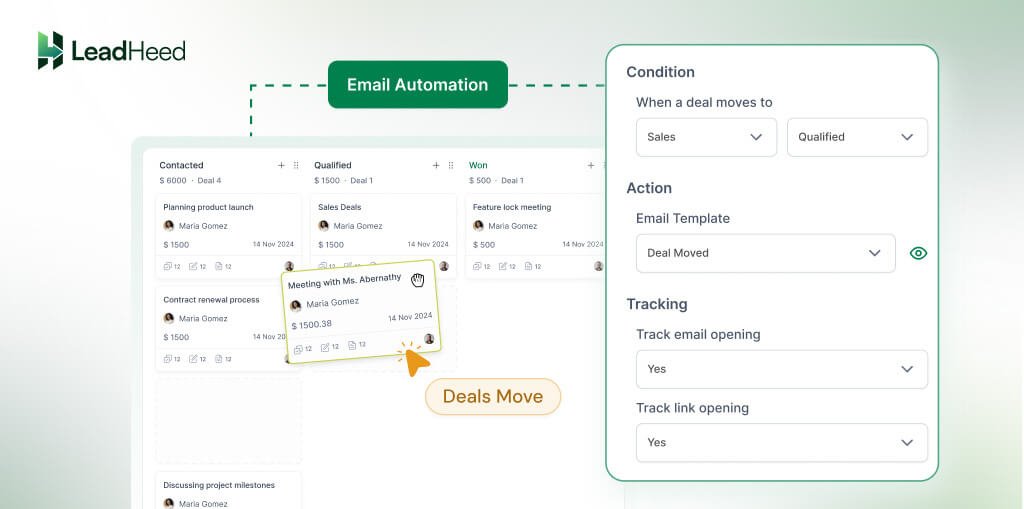
LeadHeed helps you capture leads, assign owners, track deal stages, and automate actions so your workflow stays consistent. It keeps deals moving, reduces manual chasing, and improves response speed.
Automation features:
I. Send an email when a deal changes stage
LeadHeed sends your prepared follow-up email automatically when a deal moves to a selected pipeline stage. You set the rule once, and the system keeps communication consistent across every deal.
II. Send a follow-up email when a deal stays stuck
LeadHeed triggers a reminder email when a deal stays in the same stage for a set time. It helps you re-engage silent prospects and reduce delays without manual reminders.
III. Assign a task when a deal reaches a stage
LeadHeed assigns a task to the deal owner when a deal enters a specific stage. This makes the next step clear (call the prospect, send a quote, or prepare a contract).
Features Beyond Automation:
- Capture and lead management to store, organize, and qualify leads in one place.
- Lead filters and segmentation using tags, owners, source, and status.
- Lead source tracking to understand where leads come from.
- Sales pipeline management with clear stages to track deals from inquiry to closure.
- Task management and activity history to log actions and track follow-ups.
- Omnichannel communication to manage calls, SMS, email, and social channels.
Plans & Pricing:
Free: $0 (up to 3 users)
Pro: $15/user/month ($12/month if billed annually)
Elite: $35/user/month ($28/month if billed annually)
Free trial: 14 days (no credit card required)
2. Zoho CRM
Zoho CRM is a flexible CRM with automation that helps teams run a consistent sales workflow with clear rules. It supports workflow rules that trigger instant actions and scheduled actions, so teams can automate routine steps at the right time.
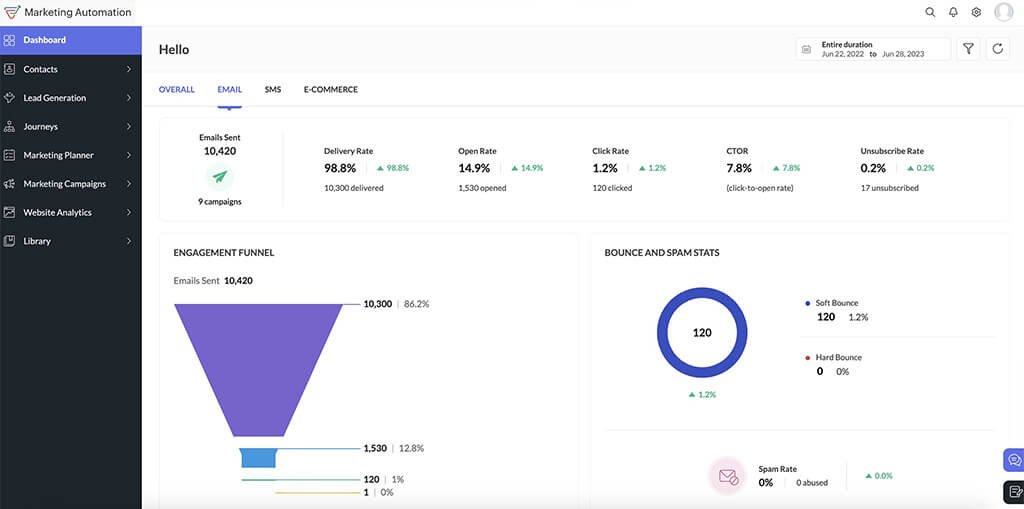
Zoho also supports process control through tools like Blueprint and Cadences. Blueprint standardizes each stage in your process, while Cadences helps teams run structured follow-ups across emails, calls, tasks, and WhatsApp.
Automation features:
I. Workflow rules for emails, tasks, and field updates
Zoho CRM workflow rules automate actions like email notifications, task creation, and field updates when conditions match.
II. Scheduled automation with time-based actions
Zoho CRM supports schedules, so you can run actions instantly or at a specific time. It helps you automate time-driven steps in your workflow.
III. Lead assignment rules (auto-route leads to the right rep)
Zoho CRM assignment rules automatically assign leads based on criteria like territory, product interest, or lead source.
IV. Lead scoring rules to prioritize high-intent leads
Zoho automation help you qualify and prioritize leads based on behavior and other signals, so teams focus on the best opportunities first.
V. Webhooks to trigger external actions
Zoho CRM lets you create webhooks and associate them with workflow rules, so workflows can push data to other tools when automation runs.
VI. Cadences for sequential follow-ups
Cadences helps teams run targeted follow-ups across emails, calls, tasks, and WhatsApp inside a single workflow.
Features Beyond Automation:
- Lead, contact, and deal management.
- Sales pipeline and stage tracking.
- Email integration and conversation history.
- Call logging, meetings, and task management.
- Reports and dashboards for sales tracking.
- Custom fields, modules, and layouts.
Plans & Pricing:
Free Edition: $0 (up to 3 users)
Standard: $800/user/month
Professional: $1400/user/month
Enterprise: $2400/user/month
Ultimate: $2600/user/month
Free trial: 15 days (no credit card required)
3. Pipedrive
Pipedrive is a sales-first CRM with automation built around a visual pipeline. It helps teams reduce manual work and keep deals moving by automating routine actions across stages, activities, and follow-ups.
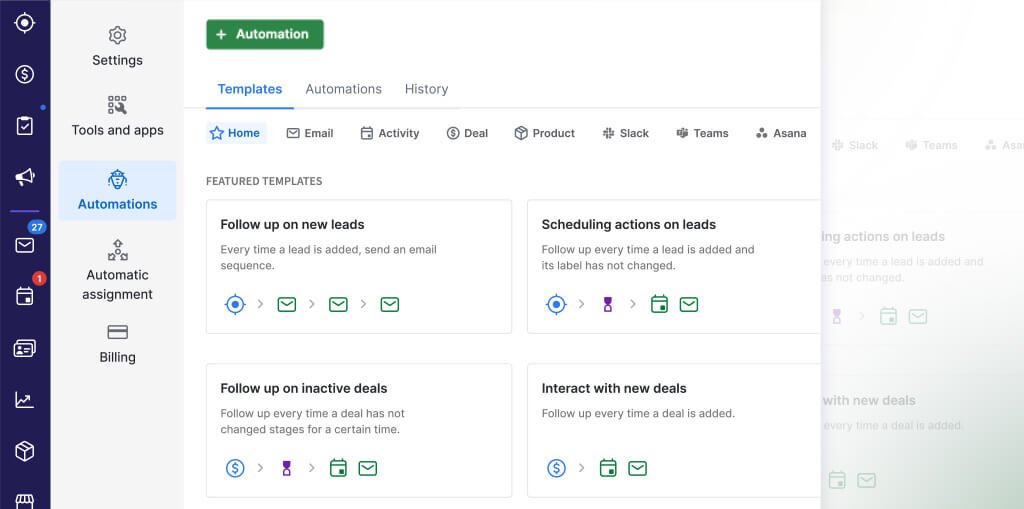
Pipedrive also supports timed automation using delay steps, so you can run follow-ups after set hours or days. It can trigger email workflows and notifications based on deal changes, field updates, and activity status.
Automation features:
I. Schedule workflow steps with delays
Pipedrive lets you add delay steps, so actions can run later at a set time or date (not only instantly).
II. Send Slack or Microsoft Teams alerts automatically
Pipedrive can send real-time Slack notifications when a deal, contact, or activity gets created, updated, or deleted. + workflow templates for Slack and Microsoft Teams.
III. Run automations and nurturing sequences for follow-ups
Pipedrive includes “automations and nurturing sequences” on its Growth plan and above, which helps teams standardize outreach and follow-up execution.
IV. Send personalized emails automatically from triggers
Pipedrive can send a personalized email when a deal is created or reaches a selected stage.
Features Beyond Automation:
- Visual sales pipeline and deal tracking.
- Contact and organization management.
- Activity and task management (calls, meetings, follow-ups).
- Calendar sync and meeting scheduling.
- Email sync and email tracking.
- Sales reporting and forecasting dashboards.
- Lead capture tools (forms, chat, chatbot).
Plans & Pricing:
Lite: $19/user/month ($14/month, if billed annually)
Growth: $34/user/month ($24/month, if billed annually)
Premium: $64/user/month ($49/month, if billed annually)
Ultimate: $89/user/month ($69/month, if billed annually)
Free trial: 14 days (no credit card required)
4. Salesforce
Salesforce is a powerful CRM with automation for teams that need deep control over sales workflow, data, and reporting. Many companies choose it when they want a system that scales across teams, regions, and complex sales cycles.
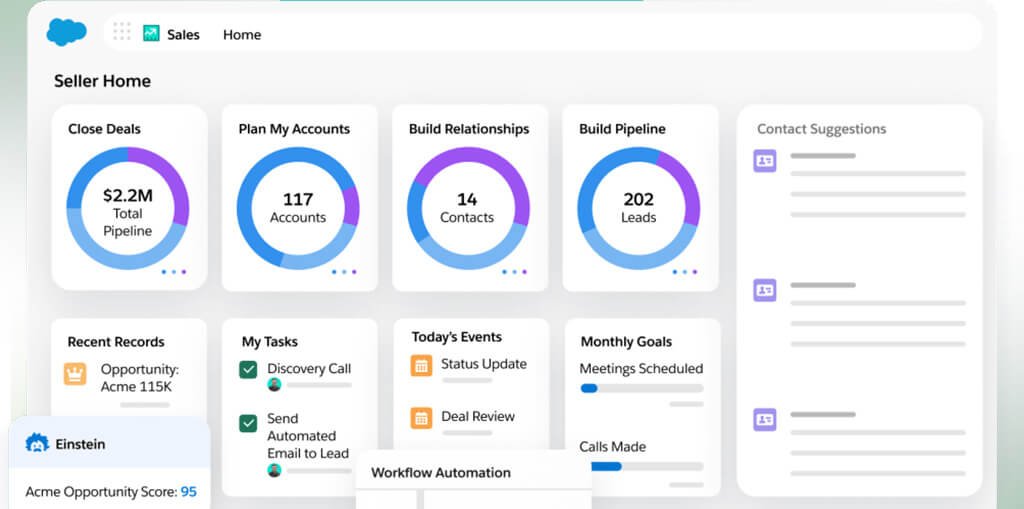
Salesforce handles CRM automation through built-in tools like Flow (for rule-based workflows), approvals (for controlled decision steps), and AI scoring (to help reps prioritize the right work). It also supports marketing automation through Salesforce Account Engagement for lead nurturing.
Automation features:
I. Automate sales workflows with Flow
Salesforce Flow runs actions when a record gets created or updated. Teams use it to automate routine steps across leads, contacts, and opportunities.
II. Create follow-up tasks and reminders automatically
Flow can create tasks and follow-ups automatically, which helps teams stay consistent without manual tracking.
III. Run approval processes for quotes, discounts, and contracts
Approval processes support structured approvals, with actions like email alerts, task assignment, and field updates during submission and final decisions.
IV. Auto-sync emails and calendar activity
Salesforce’s Einstein Activity Capture keeps email and calendar activity up to date in Salesforce, which reduces manual logging.
V. Prioritize leads and opportunities with Einstein Scoring
Einstein Scoring helps reps focus on the leads and opportunities most likely to convert, based on your historical conversion patterns.
VI. Automate lead nurturing with Account Engagement
Account Engagement (Pardot) includes tools like Engagement Studio, automation rules, completion actions, and segmentation rules to automate targeting and nurturing.
Features Beyond Automation:
- Lead, account, and opportunity management.
- Pipeline tracking and forecasting.
- Reports and dashboards for sales performance.
- AppExchange marketplace for integrations and add-ons.
Plans & Pricing:
Free Suite: $0 (upto 2 users)
Starter Suite: $25/user/month
Pro Suite: $100/user/month
Enterprise: $175/user/month
Unlimited: $350/user/month
Free trial: 30 days (no credit card required)
5. ActiveCampaign
ActiveCampaign is a crm with marketing automation that combines email marketing, automation, and a built-in sales CRM. Teams use it to run one connected workflow, from first touch to qualified lead to deal without switching tools.
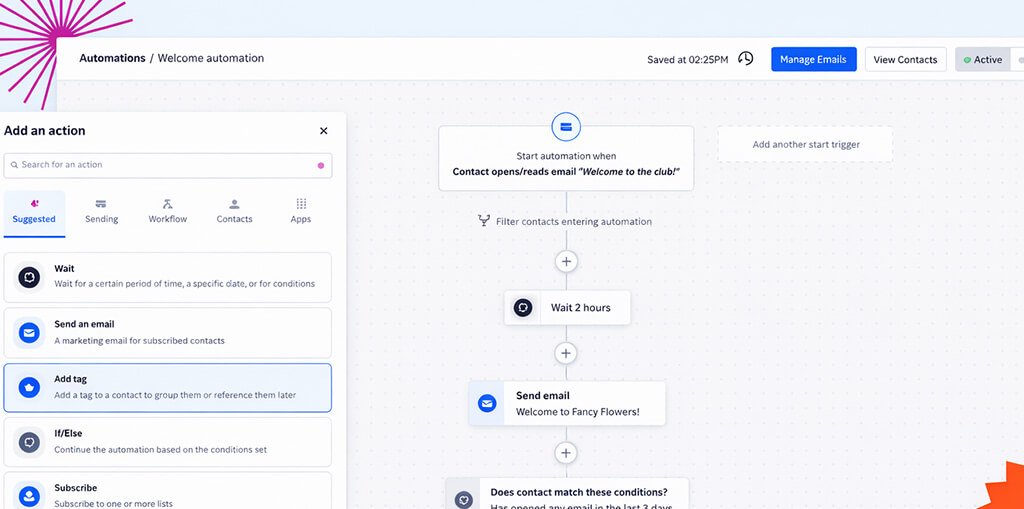
ActiveCampaign fits well when you want both sales automation tools and automated marketing CRM features in one platform, especially for lead nurturing and sales handoff.
Automation features:
I. Automate full customer journeys with triggers, actions, and logic
Automations run when conditions you set occur. You build workflows using triggers, actions, and logic to control what happens next.
II. Score leads automatically
Automated lead scoring inside the CRM lets your teams prioritize leads based on engagement and fit. You can focus on high-intent contacts only.
III. Update deal fields automatically when actions happen
Update custom deal fields through automation actions, which helps keep pipeline data accurate without manual edits.
Features Beyond Automation:
- Sales CRM with pipelines, stages, deals, and tasks.
- Email marketing and segmentation for targeted outreach.
- Landing pages and campaign tools for lead capture.
- 1,000+ integrations to connect other tools.
Plans & Pricing:
Pricing scales by contacts and selected channels.
Starting price:
$15/month (Email, 1000 contacts)
$99/month (WhatsApp, 5000 contacts)
$112/month (Email, 1000 contacts + WhatsApp, 5000 contacts)
Free trial: 14 days (no credit card required)
6. Keap
Keap is a crm with marketing automation built for small businesses that want sales and marketing in one system. It helps teams capture leads, follow up automatically, and move contacts through a clear lifecycle without manual tracking.
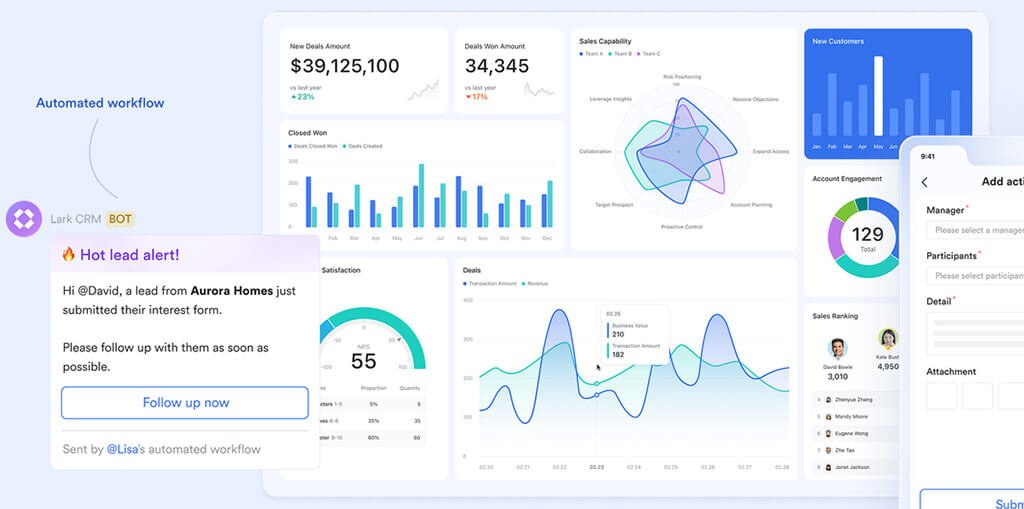
Keap also connects automation with pipeline activity, so teams can trigger actions directly from their sales process. It works well when you want one tool for lead capture, nurture, appointments, and payments.
Automation features:
I. Automate lead capture and follow-up (email + text)
Keap can send automated follow-ups as soon as a lead fills out a form on your website or social media.
II. Trigger actions from the sales pipeline
Keap lets teams create automations inside the pipeline and trigger actions based on pipeline stages. Teams can also assign tasks automatically to the right person.
III. Automate invoice reminders and payment follow-ups
Keap’s CRM automation includes sending the clients reminder mails about unpaid invoices and send a thank-you email once they pay.
Features Beyond Automation:
- Lead scoring, and contact management with tags and segmentation.
- Sales pipeline management and deal tracking.
- Landing pages and forms for lead capture.
- Email marketing (broadcast and 1:1 email sync with Gmail/Outlook).
- Quotes, invoicing, and payments.
Plans & Pricing:
Pricing scales by users and contacts.
Starting price: $299/month (2 users, 1500 contacts)
Free trial: 14-day free trial (no credit card required)
7. monday Sales CRM
monday is a flexible sales CRM with automation that helps teams manage leads, contacts, and deals in one visual workflow. It works well when you want simple, no-code automations that keep your pipeline updated and your team aligned.
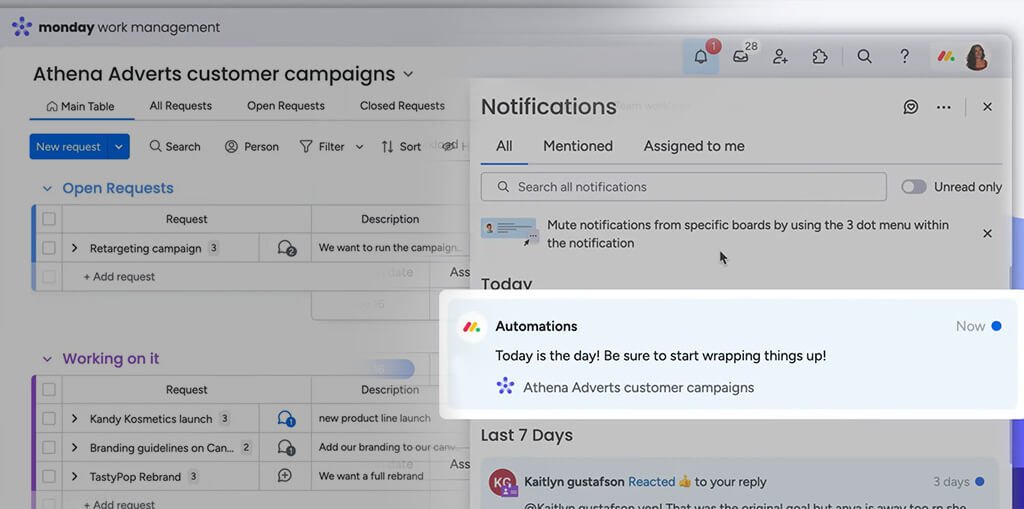
It uses a clear trigger-and-action system, so you can automate repeat steps without manual chasing. You can also run outreach sequences with automated emails and reminders, which supports both sales and marketing follow-ups.
Automation features:
I. Trigger actions when a status changes
monday lets you use a status change as a trigger to run actions like updating a date, sending a notification, moving an item between groups or boards, or changing another status.
II. Build no-code automations with triggers, conditions, and actions
You can set rules that update items, send notifications, and move work forward automatically. monday uses the same core logic: trigger → condition → action.
III. Run email sequences with automated emails and task reminders
Sequences let you set up automated emails inside a step-by-step flow, and you can use dynamic fields to personalize messages.
IV. Automate actions based on email activity
monday CRM supports email tracking and automation rules when a lead receives, opens, or replies to an email.
Features Beyond Automation:
- Visual deal pipeline and stage tracking.
- Lead, contact, and account management.
- Two-way email integration with Gmail and Outlook.
- Activity tracking for calls, meetings, and notes.
- Dashboards for analytics and reporting.
- Quotes and invoicesm, and sales forecasting.
- Mass emails and Google Calendar sync.
Plans & Pricing:
Basic: $18/user/month ($12/month, if billed annually)
Standard: $25/user/month ($17/month, if billed annually)
Pro: $41/user/month ($28/month, if billed annually)
Enterprise: Contact sales
Free trial: 14 days (no credit card required)
Conclusion
CRM automation helps teams run a consistent workflow without manual chasing. It speeds up lead response, reduces missed follow-ups, and keeps your pipeline updated with clear triggers and actions. Automated CRM also improves coordination between sales and marketing, especially when you use the CRM with marketing automation for lead nurturing.
LeadHeed offers practical, stage-based and time-based rules that automate emails and tasks without complex setup. Start your 14 days free trial today!
FAQs
What are sales automation tools?
Sales automation tools are features or software that automate sales work like follow-ups, lead routing, task creation, pipeline updates, and reminders. They help teams save time and keep execution consistent.
What are the best sales automation tools?
The best sales automation tools include LeadHeed (simple workflow rules), Zoho CRM (flexible automation), Pipedrive (pipeline-based automation), Salesforce (advanced automation), ActiveCampaign (sales + marketing automation), Keap (small business automation), and monday Sales CRM (no-code workflows).
What is marketing automation in CRM?
Marketing automation in CRM means the CRM helps you automate marketing actions like lead nurturing emails, segmentation, lead scoring, and timed follow-ups. A marketing automation CRM connects marketing actions with sales pipeline data, so leads move smoothly from nurture to sales.
What is the best CRM and marketing automation?
If you need both CRM and marketing automation in one workflow, choose a CRM with marketing automation that supports automation rules and nurturing sequences. ActiveCampaign and Keap often fit teams that want strong marketing automation with CRM.
What is the best CRM software for automation?
The best CRM with automation is the one that matches your daily workflow. For simple and fast setup, LeadHeed works well for sales + marketing automation. For deeper customization, Salesforce and Zoho CRM provide more advanced options.
What are the top 5 CRM automation tools?
The top tools for CRM automation are Salesforce, Zoho CRM, Pipedrive, ActiveCampaign, and LeadHeed. The best choice depends on whether you want advanced customization or simple automation that your team can adopt quickly.